The thought of wiring a new ceiling fan can be daunting, especially when you encounter an unfamiliar blue wire. This often-misunderstood conductor can cause confusion, but it plays a crucial role in controlling your fan’s lighting. Understanding the blue wire’s purpose and how to connect it safely is key to a successful installation. This guide will demystify the blue wire and provide clear, step-by-step instructions for wiring your ceiling fan with confidence, ensuring both the fan and its lights operate flawlessly.
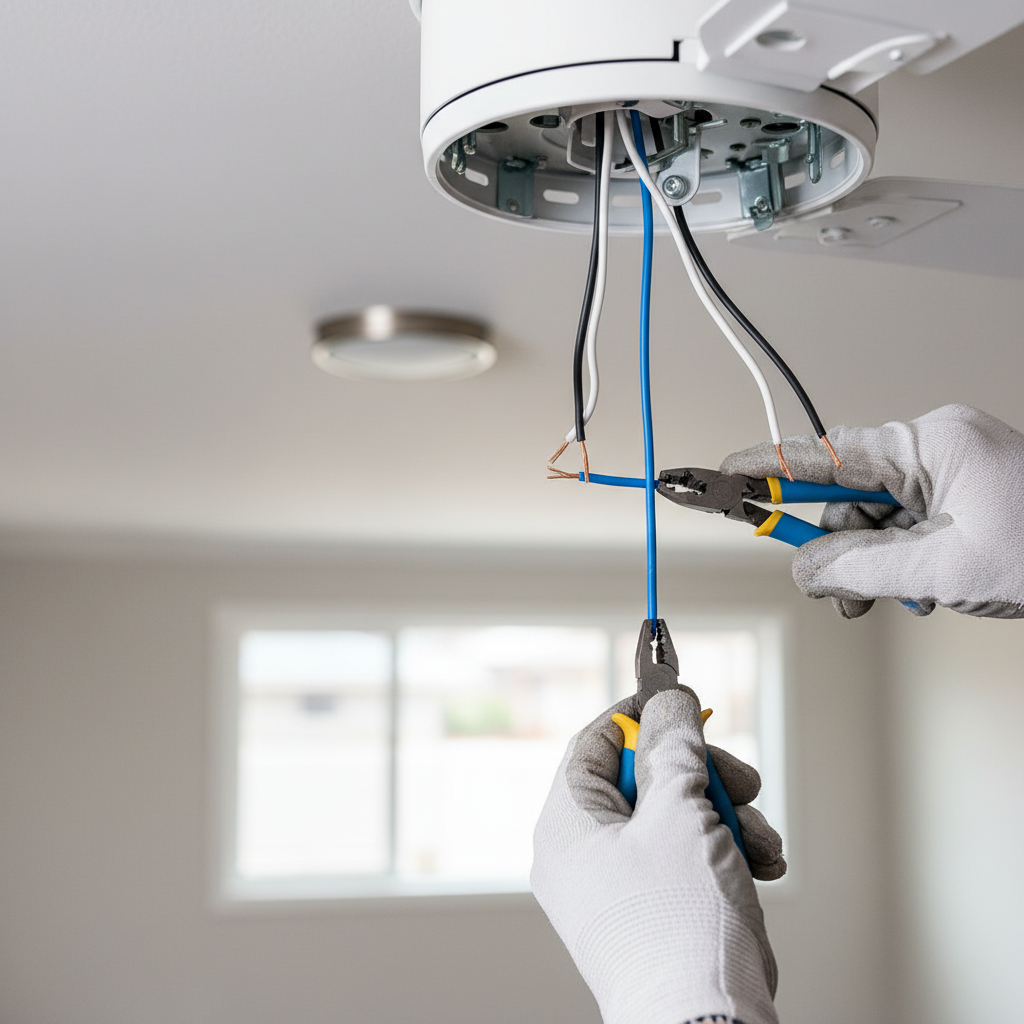
Understanding Ceiling Fan Wiring and the Role of the Blue Wire
Ceiling fan wiring typically involves several standard colors: black for the fan motor, white for neutral, and green or bare copper for grounding. However, many modern ceiling fans also feature an additional blue wire, which is specifically dedicated to powering the fan’s light kit. This blue wire allows for separate control of the lights from the fan motor, either through a dedicated wall switch, a remote control, or pull chains.
The inclusion of a blue wire is a design choice by manufacturers to provide more versatility in how you operate your fan and light. Without connecting this blue wire to a power source, the light kit on your ceiling fan will not function. It’s crucial to correctly identify this wire and understand its function to ensure proper installation and desired operation of your new fixture.
Essential Tools and Safety Precautions Before You Start
Before embarking on any electrical project, preparation and safety are paramount. Working with electricity carries inherent risks, and taking the necessary precautions can prevent accidents and ensure a smooth installation process.
Required Tools
To successfully wire a ceiling fan with a blue wire, gather the following basic tools:
- Wire Strippers: For removing insulation from wires.
- Screwdriver Set: Both Phillips and flathead are usually needed for fan assembly and terminal screws.
- Voltage Tester: An essential safety device to confirm power is off.
- Wire Nuts: To secure electrical connections.
- Electrical Tape: For added insulation and securing wire nuts.
- Sturdy Ladder: To safely reach the ceiling.
- Pliers (Optional): Needle-nose or lineman’s pliers can be helpful for twisting wires.
|
Our Picks for the Best Ceiling fan in 2026
As an Amazon Associate I earn from qualifying purchases.
|
||
| Num | Product | Action |
|---|---|---|
| 1 | ZMISHIBO Ceiling Fans with Lights and Remote, 19.7'' Low Profile Ceiling Fan, 3000-6000K Dimmable Modern Flush Mount LED Fan Light, 6 Wind Speeds, Black Fandelier Ceiling Fans for Bedroom |

|
| 2 | addlon Ceiling Fans with Lights, 42 Inch Low Profile Ceiling Fan with Light and Remote Control, Flush Mount, Reversible, 3CCT, Dimmable, Quiet, Black Small Ceiling Fan for Bedroom Indoor/Outdoor Use |
|
| 3 | Asyko 46" Low Profile Ceiling Fan with Light and Remote Control,Black Modern Flush Mount Ceiling Fan with Lights for Bedroom, Reversible, Dimmable, Noiseless |
|
| 4 | Ceiling Fans with Lights - 42 Inch Low Profile Ceiling Fan with Light and Remote, Reversible DC Motors, 3CCT Dimmable Timer Noiseless, Black Flush Mount Ceiling Fan for Bedroom/Living Room |
|
| 5 | Passky Ceiling Fans with Lights, 52 inch Sleek Ceiling Fan with Light and Remote Control, 3CCT, Dimmable, Reversible, Noiseless, Black Ceiling Fan for Bedroom, Living Room |
|
| 6 | Ceiling Fans with Lights, 42 Inch Ceiling Fan with Light And Remote, 3CCT Flush Moun Low Profile Ceiling Fans, 6 Speed Noiseless LED Ceiling Fan, Black Ceilings Fan with Remote for Bedroom Living Room |
|
| 7 | Ceiling Fans with Lights, 52 Inch Modern Ceiling Fans with Lights and Remote Control, DC Reversible Motor, Noiseless, 3CCT, Ceiling Fan for Bedroom, Living Room, Apartment Indoor/Outdoor Use |
|
| 8 | ZMISHIBO 52 Inch Ceiling Fan with Light, App&Remote Control, Flush Mount Low Profile, Dimmable 20W LED Light, Quiet Reversible Motor for Bedroom, Living Room, Apartment, Black |
|
| 9 | Fanbulous 52 Inch Ceiling Fans with Lights and Remote, Stepless Color Temperature Change & Dimmable 20W LED Ceiling Fan, 6 Speeds Reversible Quiet DC Motor for Bedroom, Living Room, Apartment, Black |
|
| 10 | Amico Ceiling Fans with Lights, 42 inch Low Profile Ceiling fan with Light and Remote Control, Flush Mount, Reversible, 3CCT, Dimmable, Noiseless, Black Ceiling Fan for Bedroom, Indoor/Outdoor Use |
|
Safety First
Your safety is the highest priority. Follow these critical precautions:
- Turn off Power: ALWAYS switch off the power to the circuit at your home’s main electrical panel (breaker box) before starting any work.
- Verify Power is Off: Use a non-contact voltage tester to confirm that no power is flowing to the wires in the ceiling box.
- Consult an Electrician: If you are unfamiliar or uncomfortable with electrical work, or if your house wiring seems unusual, do not hesitate to consult a certified electrician. Local electrical codes may also apply, and a professional can ensure your installation meets all requirements.
- Wear Safety Gear: Consider wearing safety glasses and rubber gloves for an extra layer of protection.
Step-by-Step Guide to Wiring a Ceiling Fan with a Blue Wire
Wiring a ceiling fan with a blue wire can be straightforward if you follow these steps carefully. The process typically involves connecting the fan’s wires to the corresponding wires in your ceiling electrical box.
Preparing the Installation
- Mount the Fan Bracket: Securely attach the ceiling fan mounting bracket to the electrical box in the ceiling. Ensure the electrical box is rated to support the weight of a ceiling fan.
- Bring Down Existing Wires: Gently pull the electrical wires from the ceiling box through the center opening of the mounting bracket, allowing enough slack to work comfortably.
Identifying Your House Wires
Before making any connections, identify the purpose of each wire emerging from your ceiling box:
- Live/Hot Wires (Power): These typically carry current. In older homes, these might be black. In newer installations or for separate fan/light control, you might find both black and red wires from the house, both of which are “hot” or “live”.
- Neutral Wire: This wire completes the circuit and is almost always white.
- Ground Wire: This is a safety wire, usually bare copper or green, designed to protect against electrical shock in case of a fault.
Connecting the Fan Wires
Most ceiling fans will have four wires: black, blue, white, and green/bare copper.
- Ground Wire Connection: Connect the green or bare copper ground wire from the ceiling fan to the green or bare copper ground wire from the ceiling electrical box. Also, connect this to the fan’s mounting bracket if it has a ground screw. Secure with a wire nut.
- Neutral Wire Connection: Connect the white neutral wire from the ceiling fan to the white neutral wire from the ceiling electrical box. Secure with a wire nut.
- Connecting the Blue Wire (Fan Light): This is where scenarios can differ based on your home’s wiring and desired control:
- Single Switch Control (Fan and Light on one switch): If you have only one hot wire (typically black) coming from your ceiling box, connect both the blue wire (light) and the black wire (fan motor) from the ceiling fan to this single black hot wire from the ceiling. This means the wall switch will turn both the fan and light on/off simultaneously. You can then use the fan’s pull chains or a remote for individual control.
- Dual Switch Control (Separate Fan and Light control): If your ceiling box has two hot wires (e.g., black and red), one is typically for the fan and the other for the light. Connect the blue wire (light) from the ceiling fan to the red hot wire (or another designated switched hot wire) from the ceiling. Then, connect the black wire (fan motor) from the ceiling fan to the black hot wire from the ceiling. This setup allows you to control the fan and light independently using two separate wall switches.
Securing Connections and Testing
- Secure Connections: Twist wire nuts tightly onto each connection point, ensuring no bare copper is exposed. You can optionally wrap electrical tape around the wire nut and wires for extra security.
- Tuck Wires: Carefully push the connected wires back into the ceiling electrical box, making sure they are not pinched.
- Mount the Fan: Follow your fan’s instructions to complete the physical mounting of the fan body and blades.
- Test the Fan: Once everything is securely mounted, turn the power back on at the circuit breaker. Test the fan and light functions from your wall switches, pull chains, or remote control.
Common Wiring Scenarios and Troubleshooting
Understanding different wiring setups and knowing how to troubleshoot common issues can save you time and frustration during installation.
Single Switch vs. Dual Switch Wiring
As detailed above, the primary difference for the blue wire lies in your home’s wall switch configuration.
- Single Switch: If you only have one wall switch controlling the ceiling fixture, you will typically connect both the fan’s black wire and its blue wire to the single hot wire from the ceiling. This consolidates control to one switch, with fine-tuning done via pull chains or remote.
- Dual Switch: If your room is pre-wired with two wall switches for the ceiling fixture, you’ll connect the fan’s black wire to one switched hot wire (e.g., house black) and the fan’s blue wire to the other switched hot wire (e.g., house red). This provides independent control for the fan and light.
When There’s No Red Wire from the House
It’s common for older homes to only have one hot (black) and one neutral (white) wire in the ceiling box, even if you want separate fan and light control. In this situation:
- Connect both the blue and black wires from the fan to the single hot (black) wire from the ceiling.
- You will then use the pull chains on the fan (or a remote control if your fan has one) to operate the fan motor and light kit independently. The wall switch will act as a master on/off for both.
Troubleshooting
- Light Not Working, Fan Works:
- Check the connection of the blue wire. Is it securely connected to a hot wire?
- Ensure the light bulbs are correctly installed and functional.
- Verify the light’s pull chain (if applicable) is in the “on” position.
- Check for loose connections at the light kit itself.
- Fan Not Spinning, Light Works:
- Check the connection of the black wire. Is it securely connected to a hot wire?
- Verify the fan’s pull chain (if applicable) is in the “on” position and speed settings.
- Neither Fan Nor Light Works:
- Confirm the power is on at the circuit breaker.
- Check all main connections: hot, neutral, and ground. A loose neutral can affect both.
- Use your voltage tester to ensure power is reaching the ceiling box.
- Consult your fan’s specific wiring diagram, as some manufacturers may use slightly different color codes.
Advanced Tips for Ceiling Fan Installation
Beyond the basic wiring, a few considerations can enhance your ceiling fan experience and longevity.
Integrating with Smart Home Systems
Many modern ceiling fans are compatible with smart home systems or offer smart control options. If you’re looking to integrate your fan into a smart home, ensure you check the fan’s specifications for compatibility. Some require specific smart switches, while others have built-in smart receivers. The blue wire’s distinct function for the light kit often simplifies integrating separate lighting control into these systems.
Fan Balancing
After installation, if your ceiling fan wobbles, it’s likely out of balance. Most fans come with a balancing kit, which includes weights and clips. To balance:
- Attach a clip to the trailing edge of one fan blade.
- Turn on the fan to a medium speed and observe if the wobble improves or worsens.
- Move the clip to different blades or different positions on the same blade until the wobble is minimized.
- Once the ideal position is found, replace the clip with a permanent adhesive weight from the kit.
Conclusion
Wiring a ceiling fan with a blue wire, primarily for its light kit, is a common home improvement task that is manageable with careful attention to detail and safety. By understanding the function of each wire – black for the fan, blue for the light, white for neutral, and green/bare for ground – you can confidently connect your new fixture. Whether you opt for single or dual switch control, always ensure the power is off, connections are secure, and you’ve tested the system before completing the installation. Taking the time to do it right will provide you with years of comfortable airflow and ambient lighting. What wiring challenges have you encountered in your home projects?
Frequently Asked Questions
How to identify the blue wire in a ceiling fan?
The blue wire is typically a standalone wire emerging from the fan’s motor housing, separate from the black (fan motor), white (neutral), and green/bare (ground) wires. It is exclusively for powering the light kit.
Can I cap off the blue wire if I don’t want a light?
Yes, if your ceiling fan has a light kit but you do not wish to use the light function, you can simply cap off the blue wire with a wire nut. Ensure it’s securely capped and not making contact with any other wires, then tuck it safely into the electrical box.
What if my house wiring doesn’t have a red wire for the light?
If your house wiring only provides one hot wire (usually black), you can connect both the blue wire (light) and the black wire (fan motor) from the ceiling fan to this single hot wire from the ceiling. You will then control the fan and light independently using the fan’s pull chains or a remote control.
Is it safe to wire a ceiling fan by myself?
Wiring a ceiling fan yourself can be safe if you have basic electrical knowledge, follow all safety precautions (especially turning off power and testing), and adhere to the manufacturer’s instructions. If you are unsure or uncomfortable at any point, it is always recommended to consult a qualified electrician.
What does it mean if my fan works but the light doesn’t?
If your fan motor operates but the light does not, it often indicates an issue with the light kit’s power connection. Double-check that the blue wire from the fan is securely connected to a hot wire from the ceiling, that the light bulbs are functioning, and that any light pull chains are in the “on” position.